

 June 17, 2023

Scripts to look up Foreign Exchange rates seem to be something of a recurring item on this blog. It is because the Internet keeps changing and what worked last year, doesn’t necessarily work this year. Also, this time, I had a need for looking up foreign exchange rates on a specific date. I found another ForEx lookup web site called Open Exchange Rates. To use this you will need a few things:
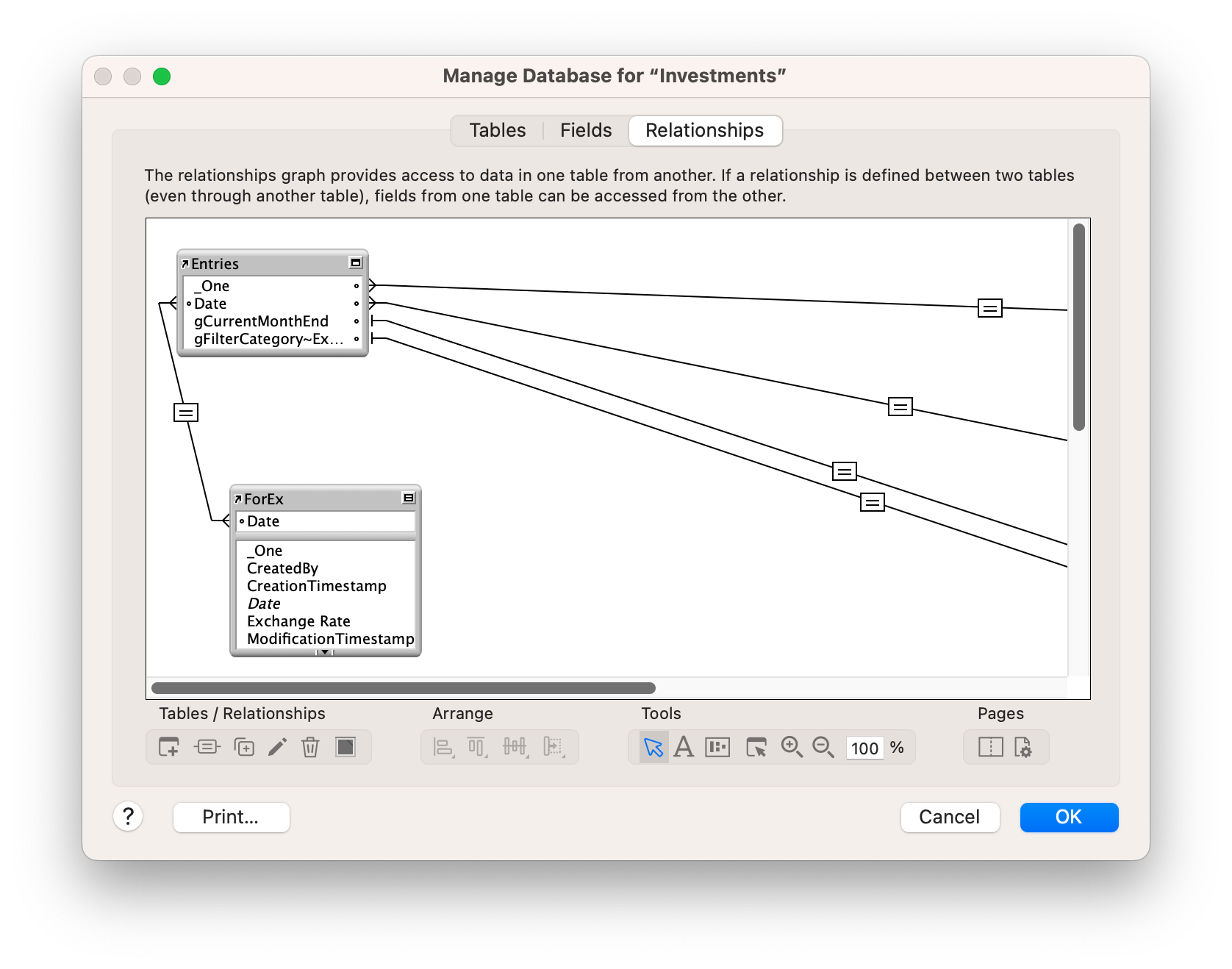
- A separate data table in your solution for Date and Exchange Rate. I have a simple relationship between the date in my Entries table and a table called ForEx, linked by Date.
- An account on Open Exchange Rates
- An API Key API Keys
- A list of Currency Codes that the web site supports. Enter your preferred base and lookup currency codes in the script. My script is fairly simple in that these two items are hard coded in, but if you need more flexibility, the codes can be set dynamically in the script.
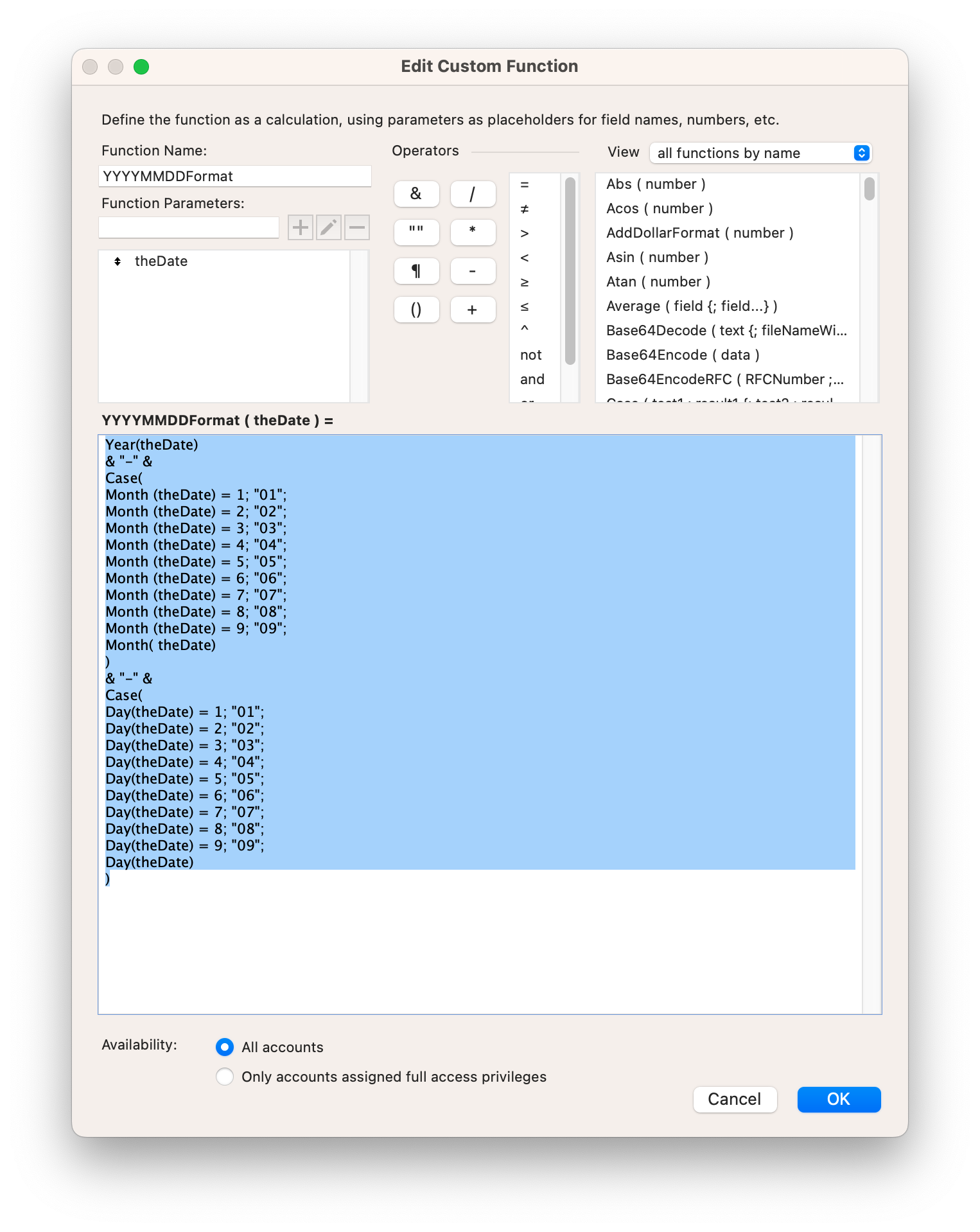
- This Custom Function to put the FileMaker date into the preferred format for Open Exchange Rates. There are probably more elegant ways to do this, but I have been using this one for years.
Year(theDate)
& "-" &
Case(
Month (theDate) = 1; "01";
Month (theDate) = 2; "02";
Month (theDate) = 3; "03";
Month (theDate) = 4; "04";
Month (theDate) = 5; "05";
Month (theDate) = 6; "06";
Month (theDate) = 7; "07";
Month (theDate) = 8; "08";
Month (theDate) = 9; "09";
Month( theDate)
)
& "-" &
Case(
Day(theDate) = 1; "01";
Day(theDate) = 2; "02";
Day(theDate) = 3; "03";
Day(theDate) = 4; "04";
Day(theDate) = 5; "05";
Day(theDate) = 6; "06";
Day(theDate) = 7; "07";
Day(theDate) = 8; "08";
Day(theDate) = 9; "09";
Day(theDate)
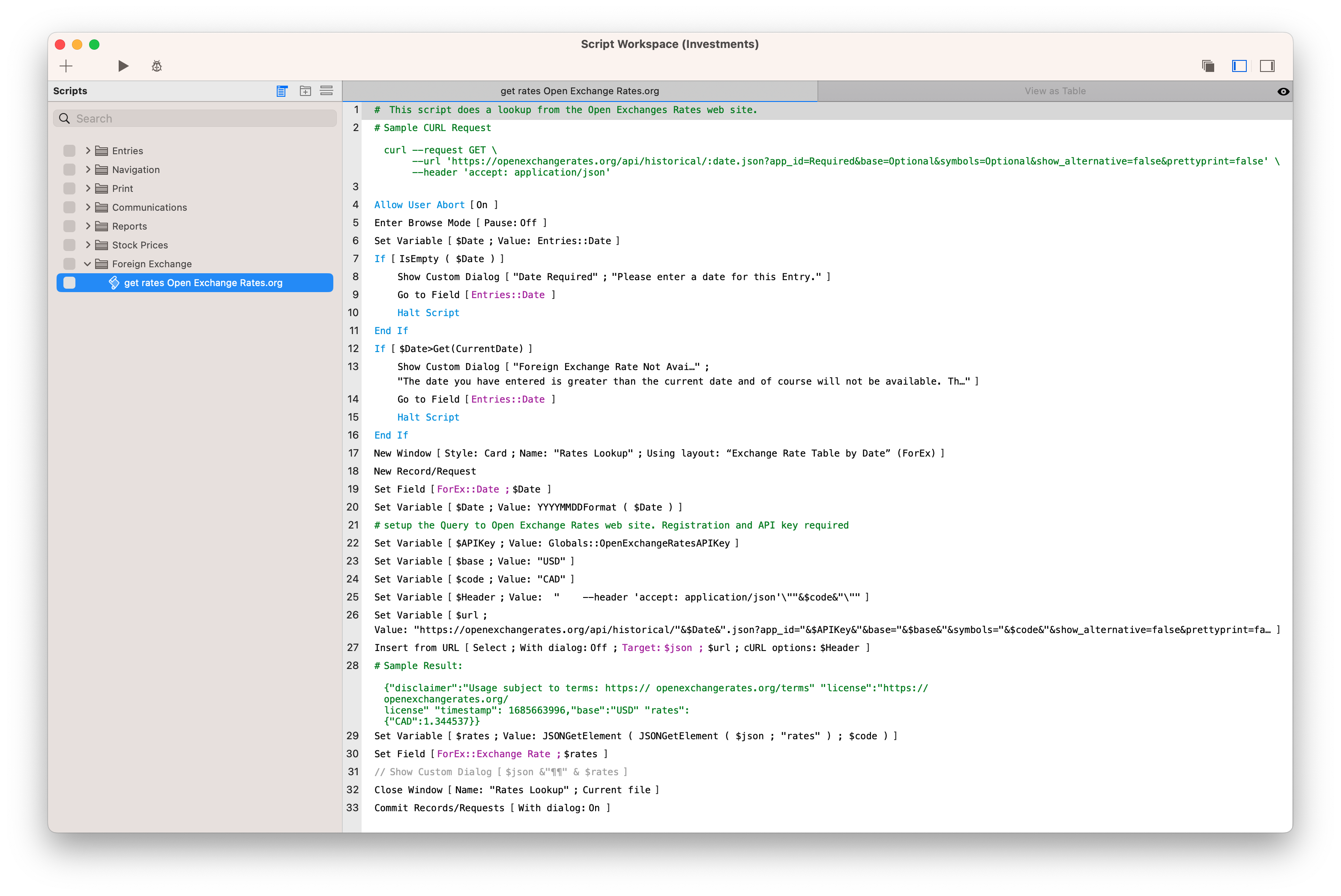
)- Some variation of the following script. It involves setting up some variables:
- an API Key ($APIKey)
- the date $Date
- the exchange FROM ($base) currency
- the exchange TO ($code) currency
- then filling that information ($url and $Header) into an Insert from URL script step. The key components look like this:
- $url = “https://openexchangerates.org/api/historical/”&$Date&”.json?app_id=”&$APIKey&”&base=”&$base&”&symbols=”&$code&”&show_alternative=false&prettyprint=false”
- $Header = ” –header ‘accept: application/json’\””&$code&”\””
 Example Script
# This script does a lookup from the Open Exchanges Rates web site.
# Sample CURL Request
curl
- request GET
-url'https://openexchangerates.org/api/historical/:date.json?app_id-Required&base=Optional&symbols=Optional&show_alternative=falsesprettyprint=false'
--header accept: application/json'
#Make sure there is a date to start with
Allow User Abort [On ]
Enter Browse Mode I Pause: Off ]
Set Variable sDate : Value: Entries::Date
If [IsEmpty ( $Date ) ]
Show Custom Dialog [ "Date Required"; "Please enter a date for this Entry." ]
Go to Field [Entries:: Date ]
Halt Script
End If
#Make sure the date isn't ahead of this one.
If [ $Date>Get (CurrentDate) ]
Show Custom Dialog [ "Foreign Exchange Rate Not Available"
The date you have entered is greater than the current date and of course will not be available. This is computer science, not science fiction!" 1
Go to Field Entries::Date
Halt Script
End If]
New Window [ Style: Card; Name: "Rates Lookup"; Using layout: "Exchange Rate Table by Date" (ForEx)
New Record/Request
# Force the date into the format that the API requires, using a Custom Function.
Set Field [ForEx::Date : $Date
Set Variable [ $Date ; Value: YYYYMMDDFormat ( $Date ) ]
# setup the Query to Open Exchange Rates web site. Registration and API key required
Set Variable [ $APIKey: Value: Globals:: OpenExchangeRatesAPIKey ]
# Set your base currency here
Set Variable [ $base: Value: "USD" ]
# Set the currency you are converting to here.
Set Variable [ $code; Value: "CAD" ]
Set Variable [ $Header; Value:
--header 'accept: application/json ''"&$codes")'! ]
Set Variable [ $url:
Value: "https://openexchangerates.org/api/historical/"&$Date&".json?app_id="&$APIKey&"&base="&$base&"&symbols="&$code&"&show_alternative=false&prettyprint=false"]
# Finally, feed the $url and $header into FileMaker's Insert from URL script step.
Insert from URL [ Select; With dialog: Off; Target: $json ; $url; cURL options: $Header ]
#for testing purposes - if you are having problems, uncomment this to see what is being returned.
// Show Custom Dialog [ $json &"¶¶" & $rates ]
# Sample Result:
Sample Result:
{"disclaimer":"Usage subject to terms: https:// openexchangerates.org/terms" "license":"https://
openexchangerates.org/
license" "timestamp": 1685663996,"base":"USD" "rates":
{"CAD":1.344537}}
Set Variable [ $rates; Value: JSONGetElement ( JSONGetElement ( $json ; "rates" ) ; $code ) ]
Set Field [ForEx:: Exchange Rate; $rates ]
Close Window [ Name: "Rates Lookup"; Current file ]
Commit Records/Requests [ With dialog: On ]
Example Script
# This script does a lookup from the Open Exchanges Rates web site.
# Sample CURL Request
curl
- request GET
-url'https://openexchangerates.org/api/historical/:date.json?app_id-Required&base=Optional&symbols=Optional&show_alternative=falsesprettyprint=false'
--header accept: application/json'

#Make sure there is a date to start with
Allow User Abort [On ]
Enter Browse Mode I Pause: Off ]
Set Variable sDate : Value: Entries::Date
If [IsEmpty ( $Date ) ]
Show Custom Dialog [ "Date Required"; "Please enter a date for this Entry." ]
Go to Field [Entries:: Date ]
Halt Script
End If

#Make sure the date isn't ahead of this one.
If [ $Date>Get (CurrentDate) ]
Show Custom Dialog [ "Foreign Exchange Rate Not Available"
The date you have entered is greater than the current date and of course will not be available. This is computer science, not science fiction!" 1
Go to Field Entries::Date
Halt Script
End If]

New Window [ Style: Card; Name: "Rates Lookup"; Using layout: "Exchange Rate Table by Date" (ForEx)
New Record/Request

# Force the date into the format that the API requires, using a Custom Function.

Set Field [ForEx::Date : $Date
Set Variable [ $Date ; Value: YYYYMMDDFormat ( $Date ) ]

# setup the Query to Open Exchange Rates web site. Registration and API key required

Set Variable [ $APIKey: Value: Globals:: OpenExchangeRatesAPIKey ]

# Set your base currency here
Set Variable [ $base: Value: "USD" ]

# Set the currency you are converting to here.
Set Variable [ $code; Value: "CAD" ]
Set Variable [ $Header; Value:
--header 'accept: application/json ''"&$codes")'! ]
Set Variable [ $url:
Value: "https://openexchangerates.org/api/historical/"&$Date&".json?app_id="&$APIKey&"&base="&$base&"&symbols="&$code&"&show_alternative=false&prettyprint=false"]

# Finally, feed the $url and $header into FileMaker's Insert from URL script step.
Insert from URL [ Select; With dialog: Off; Target: $json ; $url; cURL options: $Header ]

#for testing purposes - if you are having problems, uncomment this to see what is being returned.
// Show Custom Dialog [ $json &"¶¶" & $rates ]

# Sample Result:
Sample Result:
{"disclaimer":"Usage subject to terms: https:// openexchangerates.org/terms" "license":"https://
openexchangerates.org/
license" "timestamp": 1685663996,"base":"USD" "rates":
{"CAD":1.344537}}

Set Variable [ $rates; Value: JSONGetElement ( JSONGetElement ( $json ; "rates" ) ; $code ) ]

Set Field [ForEx:: Exchange Rate; $rates ]

Close Window [ Name: "Rates Lookup"; Current file ]

Commit Records/Requests [ With dialog: On ]
Getting the data out of the returned JSON involves using JSONGetElement to extract two levels of information, first extracting the “rates” information and then pulling from the “rates” the, in my case, “CAD” value. This is set dynamically, so it should just work with whatever currency code is used. With the rate extracted, it is a simple matter of setting a field with that value.
That’s it. Hope this is useful. Sorry, no demo file.

 HomeBase Software
Great Article.
Regarding Custom Function for the date, I use this one:
Year ( thedate ) &”-“&
Left ( “0”& Month ( thedate ) &”” ; 2 ) &”-“&
Left ( “0”& Day ( thedate ) &”” ; 2)